While professional chess software can be expensive, the great news is that you can build a comprehensive digital library to track your progress and study grandmaster games. This section guides you through powerful free software options so you can access professional-grade tools at zero cost, allowing you to invest your time into improving your strategy and enjoying the game.
SCID (The Grumpy Soviet Analysis Machine)
Get started here:
http://scidvspc.sourceforge.net/
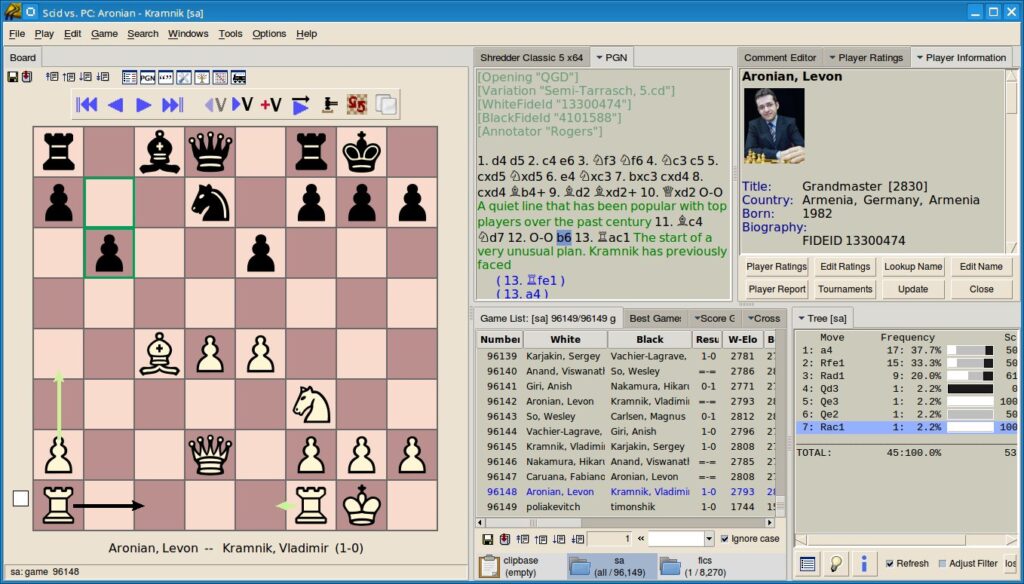
At first glance, SCID might seem like a traditional, high-density analysis tool. It is feature-rich, efficient, and incredibly powerful once you become familiar with the interface. It offers a professional level of control that rivals paid software.
While other tools might focus on a modern look, SCID is like a dedicated analyst that helps you identify areas for improvement in your openings and middle-game strategy with precision.
The Benefits of SCID
- High-speed analysis that keeps up with your study pace
- Advanced filters to find specific games or openings instantly
- Detailed statistics to track your growth over time
- A professional interface for serious chess preparation
The goal is to help you master these tools to accelerate your chess journey.
Getting the Most Out of SCID
SCID is a powerful, free tool that offers a great suite of features for improving your game. Here are some of the best ways to use it:
In-Depth Analysis: Like premium software, SCID lets you add variations, comments, and annotations to your games. You can even connect chess engines to help you evaluate positions and learn from your tactical mistakes.
Solitaire Chess: Use the “Review Game” feature (found in the Plan and Training menu) to practice. The program lets you play through a game move-by-move, alerting you if your choice matches the actual game. It’s a fantastic, interactive way to test your skills and see how you hold up against masters.
Opening Training: Practice your repertoire by having SCID play against you. It’s a helpful way to memorize lines and see your success statistics, similar to specialized opening software.
Versatility: Beyond these core tools, SCID is great for managing correspondence games, playing against engines, and creating your own tactical training databases.
Whether you’re on a budget or just looking for powerful software, SCID is a great companion for your chess journey. Feel free to explore and let me know if you have questions about any specific functions!
Analyzing Your Games for Growth
One of the best ways to improve is to maintain a database for thorough game analysis.
The Path to Enlightenment:
- Open SCID and click File → New Database
- Give it a helpful name like:
- My_Chess_Journey
- Training_Log_2026
- Import your PGN files from your online matches.
- Add annotations to notes where you found interesting variations or improvements.
This database will become a valuable resource for understanding your style and refining your skills.
Organizing Your Digital Clutter Like a Pro
Keeping your files organized is key; embrace a structured workflow. A clear setup helps you focus your mind, ensuring you’re ready to tackle even the most challenging opening variations.
The “I Swear I’m Studying” Structure:
- The Master Collection
- Games by grandmasters and top-tier players
- Historical classics and notable instructional games
- Personal Study Folders
- My personal games for review
- Opening repertoires (e.g., “Sicilian Defense Study”)
- Endgame techniques and patterns
- Tactics and training puzzles
SCID allows you to search across your entire collection at once, giving you a comprehensive view of your strengths and opportunities for growth.
Free Puzzles to Sharpen Your Tactics
Consistent tactical practice is one of the best ways to improve your game. Fortunately, the internet offers some fantastic, free resources that you can easily integrate into your training:
- ChessBlunders.org: An extensive collection of over 1.7 million puzzles—essentially a lifetime of training content. It also includes an API for those interested in technical integration.
- PGN Mentor: A great repository offering a wide variety of PGN files, ranging from tactical puzzles to full master-level games.
- Lichess Puzzle Database: Lichess provides their massive puzzle database for download. To make these compatible with SCID, you can use the offline-chess-puzzles tool.
Once you download these PGN sets, you can easily import them into SCID to keep your tactical vision sharp whenever you have a moment to practice.
to be more encouraging while keeping the practical advice.
Building Your Opening Repertoire
You don’t need to memorize every line in the book to succeed. Instead, focus on understanding the strategic themes behind your favorite openings.
Practical Steps for Success:
- Focus on one primary opening: Pick one opening for White and one or two for Black to master thoroughly.
- Learn the “Why”: Rather than just memorizing moves, study top-level games to understand the plans and pawn structures that make your chosen openings work.
- Analyze consistently: Use your database to review how elite players handle the positions you play.
- Keep a study log: Maintain notes on your favorite variations to track what you’ve learned and refine your understanding over time.
By building a deep strategic foundation, you’ll feel much more confident and prepared in every game you play.
Sci‑DB (The Expanding Bridge)
Sci‑DB is a modern fork of SCID that is currently in alpha, offering a glimpse into the future of open-source chess databases.
Why Bother?
- It features compatibility with ChessBase file formats
- It serves as an excellent conversion tool:
- ChessBase → Sci‑DB → PGN (Standard Format)
If you have legacy database files and want to use them in SCID, this is your efficient bridge.
ChessX (A Modern, Accessible Interface)
Learn more at:
https://chessx.sourceforge.net/
ChessX features a clean, intuitive interface that is easy to navigate. It is perfect for:
- Actually seeing the pieces clearly
- Reviewing and analyzing your PGN game collections
- Adding visual annotations like arrows and highlights
Reality Check:
Since PGN files are text-based, ChessX makes it simple to manage smaller collections with high visual clarity.
The “Master” Database: Creating a Comprehensive Collection for Study
Creating a “Master Database” using SCID is a fantastic way to organize a comprehensive collection of games for study and analysis. It’s a digital library where you can easily access millions of games to explore opening trends and master-level play. Start by exploring these high-quality preexisting databases:
Keeping Up with “The Week in Chess” (TWIC):
Visit “The Week in Chess” (TWIC) each Monday to stay current with the latest professional matches.
Download the newest PGNs to study current grandmaster theory and techniques.
Import these games into your Master Database to build a robust reference library for your training.
Dedicate time to study these games to deepen your understanding of diverse styles and strategies.
Final Thoughts
Building a database is about growth—it’s about organizing your study material so you can revisit key moments and insights with high-definition clarity.
These free tools empower you to:
- Manage millions of games with ease and efficiency
- Analyze your games to identify patterns and progress
- Engage with puzzles to sharpen your tactical vision
- Build and refine an opening repertoire that works for you
Remember: A well-organized database is a valuable asset for any improving player, helping you turn every game into a learning opportunity.